|
It is therefore, imperative that the users and evaluators have a friendly tool to enter the data and instantly see the warnings or violations. The tool should as far as possible indicate the hour at which the violation occurs and the clauses affected.
Unlike competitor products where challenging computations for 3-day and 7-day routines are done just once a day, our software's computations are triggered throughout the period the crew is at work. The software provides a comprehensive display of hours worked, hours rested, hours overtime with tabulated violations under various governing regulations - Confirmed violations are shown in red font. Potential violations (clauses that are violated but whose STCW waivers are also not violated), are shown in pink. Proportional violating results at the top and bottom where enough hours are not available are shown in violet.
Weekends are picked up from the PC calendar. Holidays are picked up from table setup by user as per the CBA, in the yellow tabbed sheet.
We have provided an 'Hours Effected' sheet which shows the user at which hour+time the violation is caused and in which direction. The user may select from 'Rest' regime or 'Work' regime. Also, the user can suspend MLC 2006 computations, thus allowing the STCW waiver rules to be considered. In other words, with MLC check marked, STCW waivers are not considered and violation count is potentially increased. USA Clauses are computed only if the user marks that day with 'Y'. Similarly, relevant USA clauses are computed if marked if in port or at sea.
The STCW 2010 rule of minimum 1 hour or rest is incorporated into the coding.
Monthly data is saved to tiny compressed & encrypted files and can be retrieved at any time or sent by e-mail to the head office for their reference / records thus saving paper.
Data entered in 'Hours' page is exported to reports patterned on the 'MODEL FORMAT FOR RECORD OF HOURS OF REST OF SEAFARERS'.
With version 2.01 and onwards we have provided the facility for the user to specify an international date line crossing in either direction. A day is repeated if the vessel goes from East to West and a day is skipped if the vessel crosses the date line from West to East.
With version 3.01 and onwards we have provided multi-language support for the reports pages.
In the Excel project, you can hover the mouse over the red corners to read some help by way of pop up 'tool tips'
Online Help File
Download Help File
Download Brochure Flyer
Download Presentation
Languages supported at the moment in addition to the default English -
Arabic, Bulgarian, Chinese, Croatian, Czech, Danish, Dutch, Filipino, Finnish, French, German, Greek, Hindi, Hebrew, Italian, Japanese, Norwegian, Polish, Portuguese, Romanian, Russian, Spanish, Swedish, Turkish, Ukrainian & Vietnamese
We will be improving upon the existing translations and adding new languages from time to time (as and when reports from third party translations services come in) or sooner, if requested to do so by any shipping company.
In a nutshell:
-
The product has been awarded the Software Conformity Certificate by Lloyd's Register, London as compliant with all current regulations under ILO 180 / MLC 2006 / STCW 2010 / OPA 90 / 33 CFR & 46 USC 8104. Additionally compliant with the O.C.I.M.F. Guidelines Method. The new version has been uploaded.
-
On-the-fly, computed results show the user and superintendent, in an instant, the status for compliance/non-compliance of the working hours v/s the regulations. The hour at which the violation occurs and the relevant clause is displayed.
-
The results are exported to reports designed as per the model format. The header sections of these reports will be customised according to the purchaser's SMS documentation. (Logo and reference numbers, etc.)
-
Password access with different rights for different users (Master, Crew, Office users).
-
Multi-language support, as mandated a requirement by international regulations.
-
Provision for entering a date line crossing in either direction.
-
Records are stored in a database allowing for intelligent filtering.
-
Sensitive data is encrypted.
-
The Master can assign image files of signature of each crew member. Scanned signature images are printed only at the Office.
-
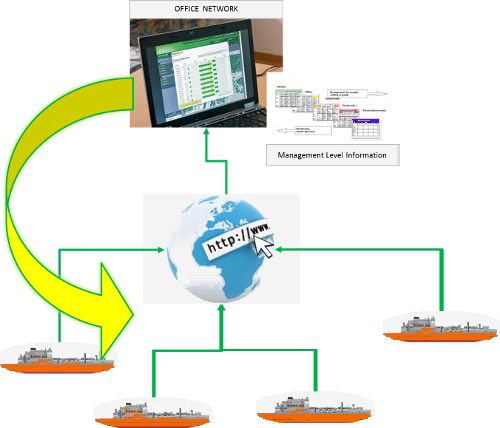
Records to be sent to the head office are encrypted and compressed. These small size encrypted text files are e-mailed to the head office and imported there by a simple button click. Summaries and data can be sent automatically if desired by the office. Import of data into the office database achieved with a single click.
-
Superintendents perusing these imported records can do a comparative analysis on a chart.
- Special export functions for office users. Please contact us for a temporary license to evaluate these features.
-
This tool is used not just for reporting but for planning the working hours of individual crew.
-
See Videos DOWNLOAD SOFTWARE
It must be noted that a ship may be detained if conditions are violated.
NEXT PAGE >> << Top >>
HSEQ / Fleet Managers - Try our Vetting Reports Control Software
Make your own tanker calculation spreadsheets or standalone projects. Download the oil calculations add-in dll(s) with all the functions you need for the tanker industry.
Can't find? Do a custom search here
|